Fuel Forward
- 4.5
- Rating
- 1.00M
- Installs
- Free
- Price
 Analysis by App-foxy
When I need to refuel without turning the stop into a separate errand, Fuel Forward makes the most sense when I already know I will be visiting a Phillips 66, Conoco, or 76 station. I tested it as an everyday fuel companion rather than treating it like a general driving app, and that distinction matters. Its purpose is focused: help me handle mobile payment and fuel savings at those station brands from one place.
Fuel Forward is a free Auto & Vehicles app from Phillips 66 Mobility for Android and iOS. It is rated for Everyone, so its audience is broad, although the practical value depends heavily on whether one of its supported stations fits naturally into your routes. The app has been around since October 1, 2014, and its current version is 7.9.2. That long presence gives it the feel of an established utility rather than a temporary promotional tool.
From an empty tank to a completed fuel stop
When I’m down to the last stretch of fuel, I find it helps to think through the stop before I pull in: is a Phillips 66, Conoco, or 76 station already on my route, and is my payment setup ready? That quick check keeps the app’s focused role clear and helps avoid fumbling with account details beside the pump. From there, the next section follows the decisions that shape a smooth visit.
You May Also Like

 Blood Strike: 2.5 Anniversary
Blood Strike’s Loadouts Turn Every Drop Into a Tactical Gamble
A close look at Blood Strike’s custom loadouts: how fast access to signature weapons reshapes its battle royale rhythm, rewards preparation, and narrows the gap between fights.

 Pandora - Music & Podcasts
Pandora’s Music Is Easy to Start, but Harder to Recover
Pandora’s strength is its low-effort path from a seed to a station. Its weak spot is how much confidence it asks you to place in connection, setup, and quiet recovery.

 8 Ball Pool
 Is Built on Rivalries, Rematches, and Routine
A close look at the rivalries, rematches, shared routines, and unanswered safety questions that turn a quick pool match into a persistent mobile community.

 Samsung Music
’s Quiet Strength Is Playing What You Already Own
Its reach comes less from spectacle than from dependable access to a personal library. That simplicity is both the app’s strongest retention engine and its ceiling.

 AccuWeather: Weather Radar
AccuWeather Review: A Quick, Clear Forecast for Everyday Decisions
For everyday plans, the best forecast is the one you can understand quickly. AccuWeather makes rain timing, radar, and local conditions easy to act on, with a few trade-offs.

 Hill Climb Racing
Why Hill Climb Racing Still Turns Crashes Into One More Run
A tiny car, a bumpy hill and one more upgrade: Hill Climb Racing keeps resurfacing because its simple chaos makes every near-miss feel personal.
More From Our News Desk
View All News


Starting with the right station and the right expectation
The first thing I would tell a new user is not to open Fuel Forward expecting a full replacement for every driving service. It is not primarily a navigation platform, a vehicle-maintenance log, or a broad fuel-price comparison tool. I see it as the payment-and-savings layer for participating Phillips 66, Conoco, and 76 locations.
That narrow focus is useful because it keeps the main task clear. If my tank is getting low and one of those brands is already on my route, I can use the app to prepare for the stop instead of reaching for a wallet at the pump. If the nearest station belongs to another brand, however, the app becomes much less relevant for that particular trip.
Before relying on it during a rushed stop, I would set it up while parked or at home. Mobile payment is most convenient when the account and payment details are already ready. Trying to create an account, understand the payment flow, and refuel at the same time is exactly the kind of avoidable friction that makes a simple app feel complicated.
Preparing before pulling onto the forecourt
My preferred workflow begins before I leave. I open the app, check whether a supported station fits my route, and make sure the payment setup is usable. This small preparation step changes the experience: at the station, I am completing a task rather than learning the interface beside a fuel pump.
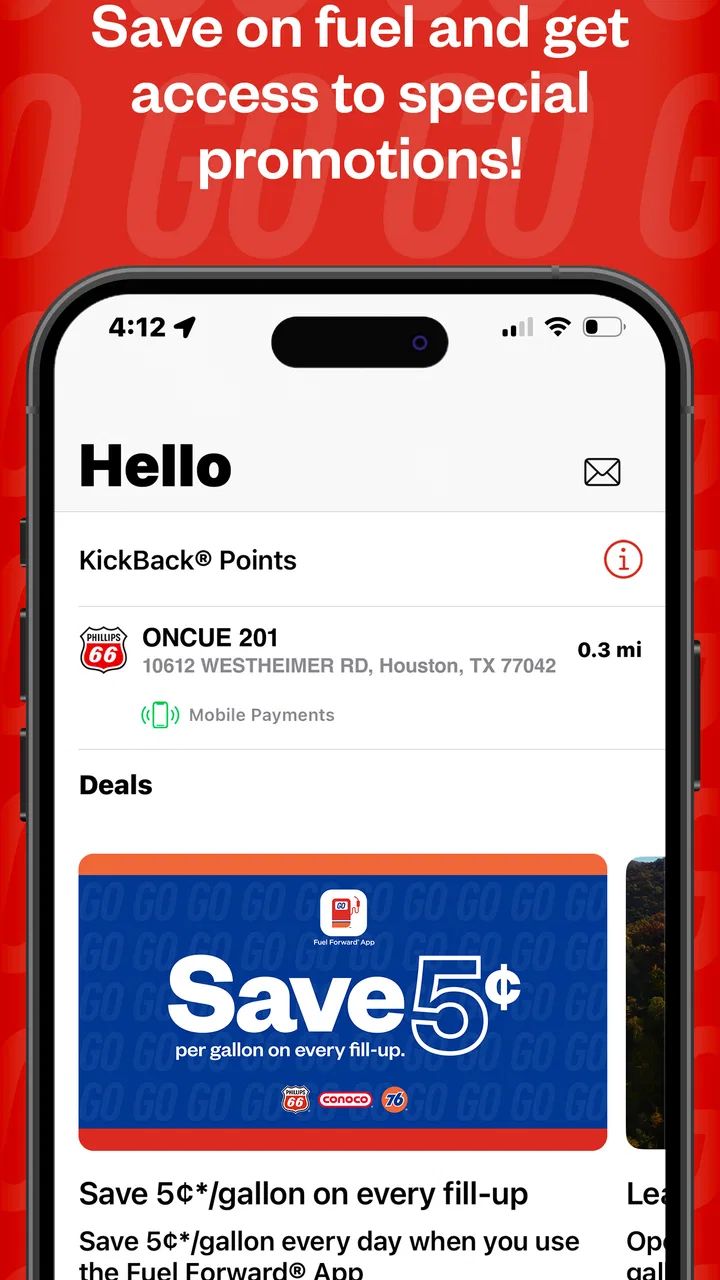
The savings side deserves the same attention. Fuel Forward is designed to combine payment with fuel savings, but the benefit is only practical when I understand how the available saving applies to the purchase. I would look through the app before driving, rather than assuming that every station visit automatically produces the same result.
That is one of the less obvious trade-offs here. A dedicated fuel app can make a regular stop more efficient, but it also creates one more account and one more routine to maintain. The saving has to be meaningful enough for me to keep using the system. For a driver who visits supported stations often, that routine can feel worthwhile. For someone who stops there only occasionally, a normal card payment may remain simpler.
Arriving at the pump
Once I arrive, the handoff is from the phone to the physical station. This is where the app’s promise becomes practical: I want to identify the correct station or pump context, authorize the payment through the app, and then fuel without treating my physical card as the center of the transaction.
I would keep the phone accessible but not use it while driving into the station. The safe sequence is simple: park at the pump, stop the vehicle, open Fuel Forward, and follow the on-screen payment steps. That sounds obvious, but it is important because a mobile-payment app is only convenient when it is used at the right moment. Trying to handle the phone while moving defeats the point of a smoother stop.
The strongest use case is a driver who repeats the same pattern several times a month. Familiarity reduces the number of decisions: I know the supported brand, I know where the app fits into the stop, and I can finish the transaction without pulling out a card. The experience is less compelling when every visit requires me to rediscover whether the location and payment flow suit my situation.
Managing the handoff between app, station, and bank
Fuel Forward sits between several systems, so the app is not the only part of the experience. There is the phone, the station equipment, the payment account, and the final bank or card record. A successful transaction depends on those pieces lining up correctly.
That is why I would not delete the usual payment option from my routine immediately. During the first few visits, I would keep a backup payment method available and check the transaction afterward. This is not a criticism unique to Fuel Forward; it is a sensible habit for any mobile payment tool used in a time-sensitive setting. The app can simplify the handoff, but it cannot remove every possible point of failure at a physical pump.
Another practical tip is to avoid treating the app as a substitute for checking the pump display. I still want to confirm the selected pump, fuel grade, and final amount at the station. Mobile authorization can reduce tapping and card handling, but it does not eliminate the need to pay attention to what the pump is showing.
What the completed result feels like
When everything lines up, the result is a more contained fuel stop. I can use the phone for payment, apply the relevant fuel-saving benefit, and leave with less physical handling at the pump. That is especially appealing in bad weather, when my hands are full, or when I am trying to keep a family trip moving.
For example, imagine leaving work with a low tank and a short list of errands. A Phillips 66 station is already near the supermarket. I can prepare Fuel Forward before leaving, arrive at the station, complete the mobile payment process while parked, refuel, and continue without searching for a card in the car. The value is not dramatic every time, but the small reduction in friction becomes noticeable when the same workflow repeats.
The savings can also make the app feel more purposeful than a payment shortcut alone. I would judge it by the combined result: how easy the payment was, whether the saving applied as expected, and whether the supported station was convenient enough to justify choosing it. A discount that requires a major detour is less useful than a modest benefit attached to a station I was already going to use.
Where the workflow breaks
The biggest limitation is coverage in the everyday sense. Fuel Forward is built around Phillips 66, Conoco, and 76 stations, so it cannot be my universal fuel wallet. If my commute, road trips, or local area rarely place me near those brands, the app will have too few opportunities to earn a permanent place on my phone.
The second weakness is dependency on a smooth digital handoff. A phone with low battery, a poor connection, an account issue, or a station-side problem can turn a quick payment into a slower one. I would not rely on it as my only way to pay during a long drive. Keeping a physical card or another accepted payment method available is a sensible backup, particularly when traveling somewhere unfamiliar.
There is also a learning curve that the short store summary does not reveal. The basic idea is easy, but the useful routine involves several decisions: whether the station is supported, whether the payment setup is ready, how the saving applies, and what to do if the pump does not respond as expected. None of these steps is impossible, yet they mean the app rewards preparation more than improvisation.
For users who mainly want the lowest price nearby, a dedicated fuel-price comparison service may be better. For users who want broad payment coverage across many brands, a bank wallet or general mobile-payment option may be more flexible. Fuel Forward is the better choice when the station brand and the savings program are already part of the user’s normal driving pattern.
Who will get the most from it
I would recommend Fuel Forward to drivers who regularly visit Phillips 66, Conoco, or 76 stations and prefer handling payments from a phone. It is also a good fit for people who like to prepare before arriving at the pump and who will actually use the fuel-saving side rather than treating it as a one-time experiment.
It can be useful for commuters, households with frequent refueling needs, and anyone who wants a repeatable station routine. The app’s Everyone rating also makes it approachable for a wide range of users, though younger or less experienced drivers still need to follow normal safety rules around parking, fueling, and phone use.
I would skip it if my preferred stations are usually outside those three brands, if I dislike maintaining separate payment apps, or if I rarely refuel at the same locations. I would also avoid making it the sole payment plan for a trip until I had used it successfully in ordinary conditions. The app is a convenience layer, not a guarantee that every station visit will be effortless.
How its reputation fits the real experience
Fuel Forward has an average rating of 4.5 from around 8.3 thousand ratings, with roughly 3.5 thousand written reviews, and it has passed one million installs. Those figures suggest that the app has found a substantial audience, but I would interpret them in context. A fuel app can be highly useful to one driver and nearly irrelevant to another simply because station coverage differs from one route to the next.
Its free price removes the biggest barrier to trying it. I can install it, test the setup during a normal station visit, and decide whether the payment and savings workflow earns a place in my routine. That is a better approach than assuming the rating alone predicts my experience.
Small habits that make the app more dependable
Set up the payment side before reaching the station, ideally while stationary and not under time pressure.
Confirm that the station brand fits the app’s supported network before taking a detour for a fuel-saving benefit.
Keep a backup payment method during early use and on longer journeys.
Check the pump display and final transaction instead of assuming the mobile flow removes every verification step.
Judge the app over several ordinary stops, not one unusually convenient visit.
These habits reveal the app’s real character. It is not magic automation; it is a structured workflow that can make a familiar fuel stop cleaner when the driver, phone, station, and payment method are all ready. The best result comes from using it deliberately, not from expecting it to solve every fueling problem.
My final take after following the full workflow
Fuel Forward is strongest as a brand-focused fuel companion, not as an all-purpose driving app. I like the idea of combining mobile payment and fuel savings, and the free entry point makes testing it easy. The current version, 7.9.2, reflects an app that continues to serve a practical, established purpose under Phillips 66 Mobility.
My recommendation is conditional but positive: install it if Phillips 66, Conoco, or 76 stations already appear naturally on your routes. Prepare the account before the first rushed stop, keep a backup payment option, and pay attention to the station and transaction details. If those conditions match your driving life, the app can turn a repetitive chore into a more organized phone-based routine. If they do not, a broader wallet or fuel-finding alternative will probably fit better.
In my experience, that is the honest outcome. Fuel Forward does not need to replace every tool on the phone to be useful. It only needs to make the supported fuel stop easier often enough to justify opening it, and for the right driver, it does.
FAQs for Fuel Forward
01What is Fuel Forward and how does it work?
Fuel Forward is a cutting-edge app designed to help users track their fuel consumption and optimize their driving habits. By inputting vehicle data and tracking trips, the app provides insights into fuel efficiency, suggests routes for better mileage, and offers tips on reducing fuel costs. It's a must-have for eco-conscious drivers.
02Is Fuel Forward compatible with all vehicles?
Fuel Forward is compatible with most vehicles manufactured after 2000, as these typically have the necessary onboard diagnostic systems. Users simply need an OBD-II scanner to connect their vehicle to the app. Check the app's compatibility guide for specific models and supported features before downloading.
03Does Fuel Forward require an internet connection to function?
Fuel Forward primarily operates offline, allowing you to track trips and monitor fuel efficiency without a constant internet connection. However, for features like real-time traffic updates and cloud data backup, an internet connection is necessary. Ensure you have periodic access to Wi-Fi or mobile data for full functionality.
04What privacy measures does Fuel Forward implement to protect user data?
Fuel Forward prioritizes user privacy by incorporating robust encryption and data protection protocols. Personal information and vehicle data are stored securely and are not shared with third parties without consent. Users can review and manage their privacy settings within the app to ensure their data is handled appropriately.
05Are there any subscription fees or in-app purchases in Fuel Forward?
Fuel Forward offers a free version with basic features. For advanced functionalities such as ad-free experience, premium route recommendations, and personalized driving tips, users can opt for a subscription plan. The app provides various pricing tiers to suit different needs and budgets, ensuring transparency and value.
Pros
- User-friendly interface for easy navigation.
- Comprehensive fuel tracking features.
- Customizable alerts for refueling.
- Integrates well with mapping apps.
- Supports multiple vehicle profiles.
Cons
- Limited offline functionality.
- Ads can be intrusive at times.
- Requires frequent updates for accuracy.
- No support for electric vehicles.
- Subscription needed for premium features.

Fuel Forward
Gallery